SIRENIA
Triggers
Triggers for automatic flow invocation
Table of Contents
A trigger is a mechanism by which an external event may cause a flow to be invoked.
When a flow is invoked with a trigger its Inputs will contain two extra pieces of information:
[eu.sirenia]Manatee.In.Triggerwill contain the type of the trigger[eu.sirenia]Manatee.In.TriggerParamswill contain any parameters the trigger may provide (see below for examples)
Adding a trigger to a flow
A trigger can be added to a flow in the Settings tab for a flow.
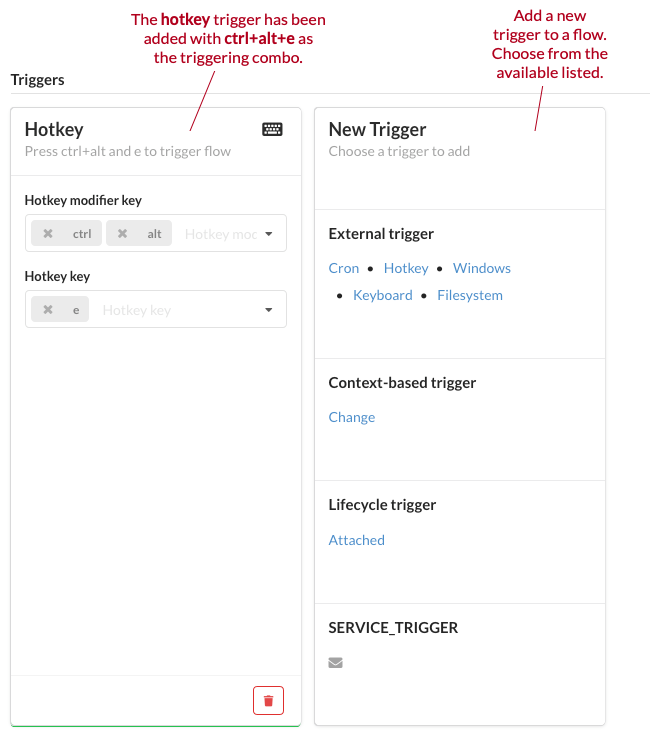
The trigger will activate on all Manatees on which it is possible to run the flow (controlled via the groups of the flow and the application that contains the flow).
External triggers
External triggers are all triggers that are external to the Manatee but are still events on the local machine.
Window
The window trigger can launch a flow based on whether a matching window is shown or hidden.
Configurable parameters
Eventwhich window-event to use (‘shown’ or ‘hidden’)Titlethe title which the window must haveClassthe class of the window frameCloseWindowwhether or not to immediately close the detected window
Parameters to flow
The trigger type is WINDOW.
titlethe actual title of the detected windowhwndthe window handlekindthe kind of event (window ‘shown’ or ‘hidden’)classNamethe class of the window framecloseWindowwhether or not the window was closed
The parameters are serialized as a JSON object.
File-system
The filesystem trigger can monitor a directory for files that are either added, removed or changed.
Configurable parameters
Directorythe directory to monitorMatcha regular expression which filters the files that will be used to trigger the flow
Parameters to flow
The trigger type is FILESYSTEM.
filethe acual file that caused the trigger to fireeventTypethe type of event (‘CREATED’, ‘CHANGED’, ‘RENAMED’ or ‘DELETED’)
The parameters are serialized as a JSON object.
Cron
The cron trigger can launch a flow on a certain time-schedule.
Configurable parameters
The trigger is configured with a cron string which specifies a schedule with which to fire the flow. The UI in Cuesta tries to be helpful in explaining when a trigger will fire as you type in the components of the cron string.
Parameters to flow
The trigger type is CRON.
cronStringthe cron string which triggered the flow
The parameters are serialized as a JSON object.
Hotkey
The hotkey trigger can launch a flow when the user hits a matching keyboard combo.
A valid combo must include at least one modifier key and one other key, e.g. ctrl+r is valid, while r is not.
Configurable parameters
modifierKeysa set of modifier keys the user must presskeysa set of keys the user must press while the modifier keys are pressed
Parameters to flow
The trigger type is HOTKEY.
modifierKeysthe set of modifier keys the user pressedkeysthe set of keys the user pressed
Keyboard
The keyboard trigger listens for fast keyboard input matching a given regular expression. The match-value of the first group in the regex is given as input to the flow. If you have any subgroups in your trigger regular expression then you need to wrap the whole regular expression in paranthesis to form the first group. E.g. you’re using this trigger for keyboard wedge configured barcode scanners and your raw input is something like: {OEM1}d01029284{NUMPAD0}{NUMPAD8}21982798{NUMPAD0}. In order to be resistant to keyboard layout changes you can then construct a regular expression:
.*d\d{8}(\{[^\}].+\})+\d{8}(\{[^\}].+\})+
But since the first group will match the {NUMPADN} elements, then that is the input given to the flow. This can then be fixed by adding an initial group:
.*d(\d{8}(\{[^\}].+\})+\d{8}(\{[^\}].+\})+)
This trigger is most useful with devices such as scanners that can be configured to act as keyboards. The trigger will hold the input characters in a buffer for a short (while) and trigger a flow if the input buffer contains a matching sequence of characters. The input itself is not blocked and will end where the window focus is.
Configurable parameters
matchthe regular expression which the input buffer must matchlookbackMsthe number of milliseconds the input buffer will contain the characters
Parameters to flow
The trigger type is KEYBOARD.
matchValuethe value of the matching string, either the first group in the regular expression or the complete match if it does not contain any groups
Event intercept triggers
The event intercept trigger can launch a flow when the user clicks a given field.
Configurable parameters
eventTypeis the type of the intercept (LEFTCLICKorRIGHTCLICK)fieldIdis the identifier of the field to intercept events on
Parameters to flow
The trigger type is INTERCEPT.
eventTypeis the type of the intercept (LEFTCLICKorRIGHTCLICK)fieldIdis the identifier of the field to intercept events onfieldNameis the name of the field clickedfieldPathis the configured path of the element clicked
Context triggers
The trigger type is CONTEXT.
Context triggers are triggers which will fire a flow once the shared context matches the preconditions for the trigger.
Change
Run a flow whenever a subject in the shared context changes a value matching the configured properties of the trigger.
Configurable parameters
subjectthe subject to matcholdValuethe old value to match (regular expression, default is empty which matches all values)newValuethe new value to match (regular expression, default is empty which matches all values)
Parameters to flow
The trigger type is CONTEXT.
subjectthe subject of the matching context itemoldValuethe previous value of the context itemnewValuethe new value of the context item
Lifecycle triggers
Lifecycle triggers are coupled with the lifecycle of the application.
Attached
The trigger will fire as soon as the application is attached to a session. It can be used as a kind of initializer. It does not have any configurable parameters or provides any meaningful input to a flow except the type of the event; LIFECYCLE and the param ATTACHED.
Triggers from services
The mail trigger will trigger a flow whenever one or more mails matching the configured preconditons are received. It must be configured with the mail service (which in turn contains server connection details).
Only unread mails can trigger a flow and as soon as a trigger runs it will mark the mail as read. This ensures that the same flow (on the same machine) does not run multiple times on the same mail. In general the same principle applies across machines, but it is not guaranteed.
Configurable parameters
servicethe mail service to connect tofromAddressthe address to match with the sender of the mail (regular expression)toAddressthe address to match with the recipient of the mail (regular expression)ccAddressthe address to match with the (cc) recipient of the mail (regular expression)subjectthe subject to match (regular expression)bodythe body to match (regular expression)attachmentsthe attachments to match (regular expression)
Parameters to flow
fromthe senders addresstothe recipient addressccthe cc addresssubjectthe subjectbodythe bodyattachmentsthe attachments
Serial port
The serial port trigger will trigger a flow whenever a message is received from the device, which matches the trigger message pattern.
Configurable parameters
Serial portthe port to monitor for messagesMessage patternthe pattern to match incoming messages against (regular expression). Note that this trigger is currently limited to matching inbound data interpreted as text according to the encoding selected in the chosen serial port service. For devices with binary protocols, this may make the regular expressions a bit harder to write. To match the byte sequence0x02 0x06 0x03, the regular expression\x02\x06\x03can be used. For binary protocol devices, the encoding selector in the serial port service should be left empty.
Parameters to flow
messagethe matched message as a string
Previous messages
The serial port service keeps track of the most recently received messages from the device. Through this mechanism a flow can inspect the messages received prior to the triggering message. Details and examples can be seen in the service document.
Message queue (MQ)
The message queue trigger will trigger a flow whenever one or more messages matching the configured preconditions are received. Each MQ trigger must be set up to use an MQ service.
Configurable parameters
Message queuethe MQ service subscription to monitor for messagesMessage patternthe pattern to match incoming messages against (regular expression).Claim patternthe pattern to match the JWT token of incoming messages against (regular expression). This makes it possible to authenticate the origin of incoming messages before letting them trigger a flow. Obtain a valid token by contacting sirenia support.Reply expectedwhether to reply to the sender of a triggering message with the result of the flow invocation or not. This enables manatee to function as a kind ofRemote Procedure Callserver.
Parameters to flow
messagethe body of the triggering message
Code extracting the triggering message:
var triggerParams = JSON.parse(Inputs['[eu.sirenia]Manatee.In.TriggerParams']);
var triggeringMessage = triggerParams.message;

Debug.showDialog(triggeringMessage);
See the service document for a detailed list of services.